
Clock-Out Time Calculator
You’re partway through the day and want a straight answer: how much longer? Enter when you clocked in, how many paid hours you need, and any unpaid breaks. The calculator shows the time left and the exact time you can leave.
By the Best Therapy Productivity Calculator team · Last updated October 2026
How is clock-out time calculated?
Add your required paid time and all your unpaid breaks to your clock-in time.
Clock-out time = clock-in time + required paid time + unpaid breaks
Paid time done = time since clock-in − unpaid breaks already taken
Paid time left = required paid time − paid time done
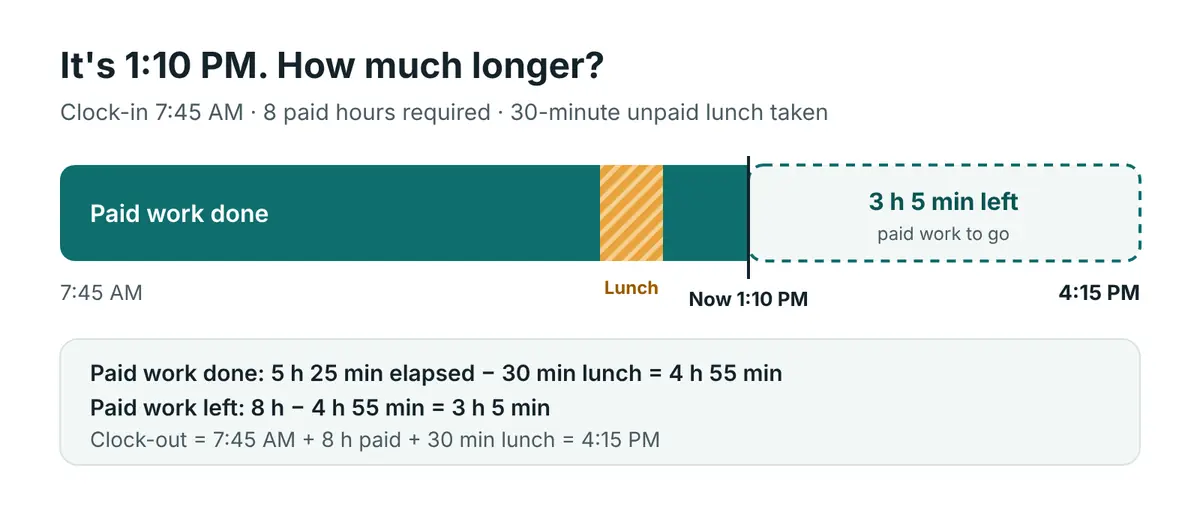
Worked example: checking the clock at 1:10 PM
Priya, a home health OT, clocked in at 7:45 AM. Her agency pays 8 hours, and she took a 30-minute unpaid lunch.
- Time since clock-in: 5 h 25 min (325 minutes)
- Minus the unpaid lunch: 4 h 55 min of paid work done
- Required paid time: 8 hours (480 minutes)
- Paid time left: 3 h 5 min
- Clock-out: 7:45 AM + 8 h + 30 min = 4:15 PM
Not sure how many paid hours you need?
If your schedule is built on a productivity target, your required paid time comes from your billable minutes, not a fixed 8 hours.
Required paid time = billable minutes ÷ (target % ÷ 100)
For example, 375 billable minutes at an 85% target means 441 paid minutes (7 h 21 min). Work that out with the therapy productivity calculator, then come back here during the day to watch the clock.
| Billable minutes | Target | Required paid time |
|---|---|---|
| 330 | 80% | 6 h 52 min |
| 360 | 85% | 7 h 3 min |
| 375 | 85% | 7 h 21 min |
| 408 | 85% | 8 h 0 min |
| 420 | 90% | 7 h 46 min |
Paid time rounded down to the whole minute.
What changes your clock-out time during the day
- A longer lunch than planned. Every extra unpaid minute moves your clock-out later by the same amount.
- A cancellation. If billable minutes drop and your target stays the same, your required paid time drops too. Recalculate before you start filling the gap with “extra” work.
- An add-on patient. More billable minutes means more paid time at the same target.
- Overnight shifts. If your shift crosses midnight, the calculator labels the result “next day.”
Clock-out vs productivity: which calculator do you need?
| Your question | Calculator |
|---|---|
| “What time can I leave, given my billable minutes and target?” | Therapy Productivity Calculator |
| “Same, but I take an unpaid lunch” | Productivity Calculator with Lunch Break |
| “I’m at work now. How much longer?” | This calculator |
| “What was my productivity % today?” | Productivity Percentage Calculator |
Frequently asked questions
What time do I leave after 8 hours with a 30-minute lunch?
Add 8 hours 30 minutes to your clock-in time. If you clocked in at 7:45 AM, that’s 4:15 PM.
Do short breaks count toward my time left?
Paid breaks of 20 minutes or less are work time under federal law, so they don’t add to your day. Only unpaid breaks push your clock-out later.
What if my current time is earlier than my clock-in time?
Either fix the times, or turn on the overnight option if your shift crossed midnight.
Does this calculate pay or overtime?
No. It’s a time planner only. Overtime and pay rules come from your employer and your state.
Can I use this on my phone during a shift?
Yes. It works in any mobile browser, and the current time fills in when you open the page.
Check your time left now. Use the calculator at the top, or plan tomorrow with the therapy productivity calculator.
Planning tool only, not payroll or legal advice. Follow your employer’s timekeeping rules.
Sources
- U.S. Department of Labor, Breaks and Meal Periods
- U.S. Department of Labor, Fact Sheet #22: Hours Worked Under the FLSA