
Therapy Productivity Pace Calculator
Partway through the day and wondering where you stand? Enter your shift times, unpaid break, target, and the treatment minutes you’ve done so far. The calculator shows your current productivity, whether you’re ahead or behind, and the pace you need for the rest of the shift.
By the Best Therapy Productivity Calculator team · Last updated October 2026
How pace is calculated
- Planned paid minutes = (end − start) − all unpaid breaks
- Target minutes for the day = planned paid minutes × target
- Paid minutes so far = (now − start) − breaks already taken
- Current productivity = minutes done ÷ paid minutes so far × 100
- On-pace minutes by now = paid minutes so far × target
- Pace needed for the rest of the day = (target minutes − minutes done) ÷ remaining paid minutes × 100
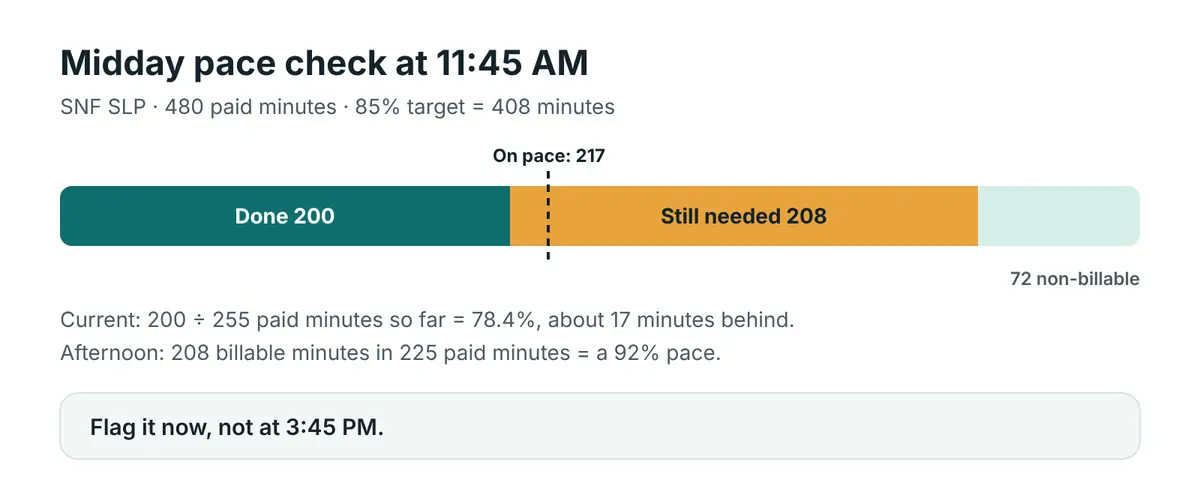
Worked example: SNF SLP at 11:45 AM
Shift 7:30 AM to 4:00 PM, 30-minute unpaid lunch later in the day, 85% target, 200 treatment minutes done so far.
| Value | |
|---|---|
| Planned paid minutes | 480 |
| Target for the day | 408 |
| Paid minutes so far | 255 |
| Current productivity | 78.4% |
| On-pace minutes by now | about 217 |
| Status | about 17 minutes behind |
| Still needed | 208 minutes in 225 paid minutes, a 92% pace |
A 92% pace for the afternoon is tight. This is the moment to decide: move documentation to a protected block, ask about a co-treat, or tell your manager early rather than at 3:45 PM.
What to do if you’re behind
- Talk early. Managers can often shift a patient or adjust expectations if they know by midday.
- Don’t shorten medically necessary sessions to catch up. Session length should follow the plan of care and your clinical judgment.
- Note the cause. Holds, late patients and add-on evaluations are useful data for later.
Frequently asked questions
What does “on pace” mean?
Your billable minutes so far are at or above your target percentage of the paid minutes so far.
How are unpaid breaks handled?
Breaks already taken are removed from paid time so far. Breaks still to come are removed from the remaining paid time.
Can I use this for a 10-hour shift?
Yes. Enter your real start and end times and all unpaid breaks.
Related: Weekly productivity calculator · Clock-out time calculator · Productivity percentage calculator
Planning tool only. Your employer’s definitions apply.